AI Biomechanics Replay: Why Peak-Rep Skeleton Snapshots and Ghost Overlays Are Changing Workout Form Correction
📌 Key Takeaways
- The Peak-Rep Problem: Traditional workout apps only count numbers or show standing selfies. They miss the crucial bottom inflection point where joint mechanics break down under maximum load.
- AI Peak-Rep Skeleton Snapshot: Posiqo tracks 33 anatomical landmarks live at 30 FPS and freezes the exact inflection frame as a compact 13-joint wireframe (
< 1 KB) to audit knee angles, heel stability, and symmetry.- Worst vs. Best Rep Breakdown: Comparing your worst rep (e.g., Rep #10 at 44°, 76% form with a
"Keep heels flat!"cue) directly against your cleanest rep (Rep #16 at 36°, 84% form) reveals exactly where technique slipped mid-set.- Kinematic Ghost Overlay: By superimposing your actual joint skeleton over the 90° parallel target (
44° vs. 90°,-46°) or over your best rep (44° vs. 36°,+8°), lifters instantly see angular drift without subjectivity or debate.- 100% On-Device Privacy: Zero video frames are saved to disk or uploaded to the cloud. All diagnostic replays are rendered purely from privacy-safe kinematic vector coordinates.
What Is AI Biomechanics Replay and Why Does It Replace Guesswork?
Direct Answer: AI Biomechanics Replay is an on-device computer vision diagnostic that isolates and freezes your 3D skeletal joint coordinates at the deepest inflection point of every repetition. Instead of giving you a vague percentage score or requiring you to scrub through minutes of video, it gives you an instant, clinical post-set audit comparing your actual peak-load joint angles against ideal biomechanical benchmarks.
Every repetition in resistance training consists of three distinct phases: the eccentric descent, the inflection turnaround (the exact millisecond where downward motion stops and upward thrust begins), and the concentric ascent.
For decades, athletes faced an impossible choice: either hire a human personal trainer for every session, record tedious gym videos that fill up phone storage, or guess whether their depth was acceptable.
Posiqo’s AI Biomechanics Replay eliminates that compromise by turning your smartphone camera into an automated laboratory-grade motion capture system. By mapping 33 3D skeletal landmarks at 30 frames per second, the AI pinpoints the exact frame of maximum load and preserves it as an interactive diagnostic snapshot.
How Does the Deep Depth Audit Compare Worst Rep vs. Ideal?
Direct Answer: The Worst vs. Ideal depth audit automatically matches your set’s poorest repetition against the gold-standard 90° parallel interior knee angle (
180°standing straight,90°controlled parallel). By visualizing your worst inflection frame side-by-side with the target standard, the system immediately exposes both shallow depth cuts (> 90°) and fatigued bottom collapse (< 90°over-compression).
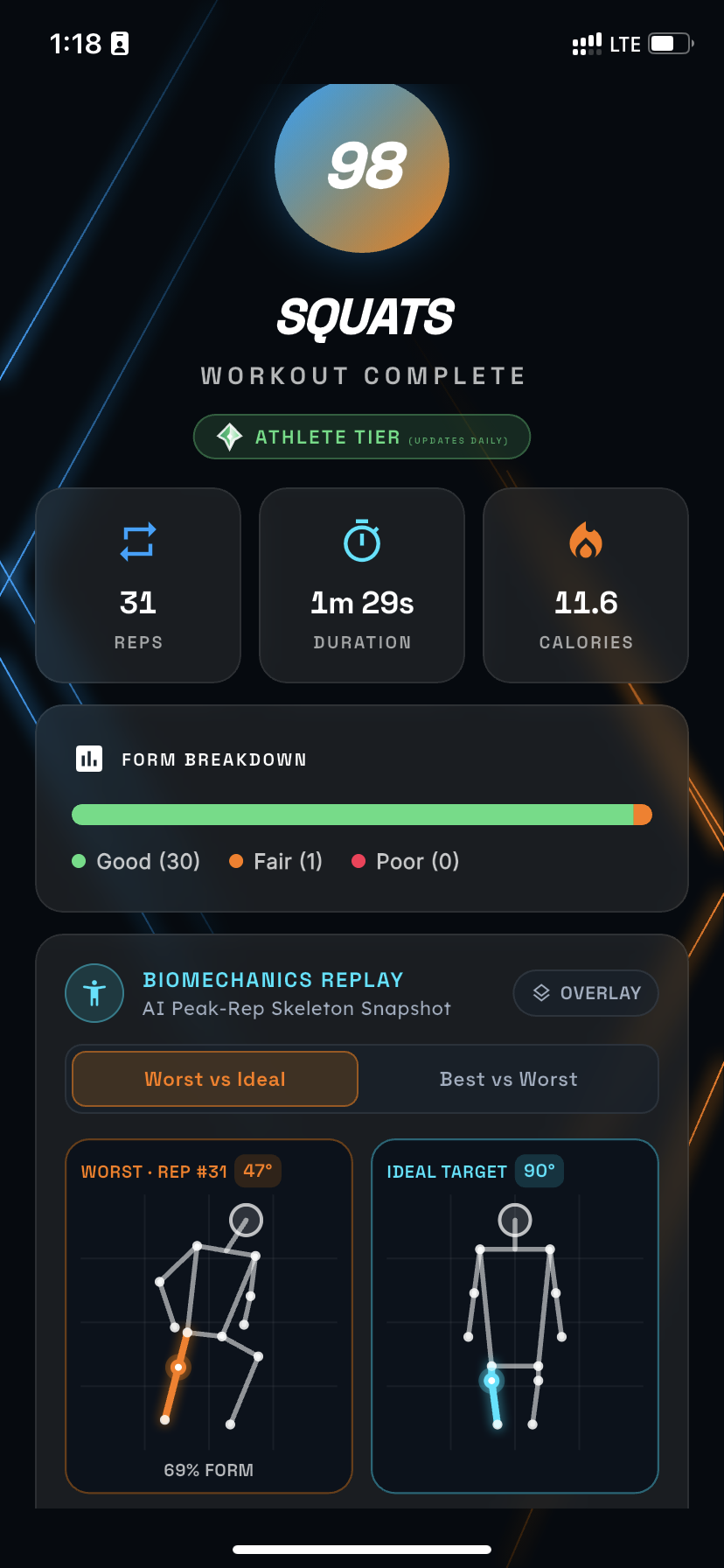
Deconstructing the 47° Inflection Breakdown
In the diagnostic replay above, the lifter completed a 31-rep squat set with an overall 98 score (30 Good, 1 Fair). On the final repetition, Rep #31 collapsed to a 47° interior knee angle (a 43° deviation past the 90° parallel target, earning a 69% Form Score and flagged as "Fair").
Instead of wondering why your knees or ankles ache after high-rep sets, the Biomechanics Replay provides instant forensic evidence of how your alignment shifted at maximum load.
Biomechanical Differences: Compromised Form vs. Controlled Parallel Target
| Biomechanical Variable | ❌ Shallow Half-Squat (> 120° Interior Angle) | ⚠️ Fatigued Collapse (47° Interior Angle · Rep #31) | ✅ 90° Parallel Target (Ideal Form) |
|---|---|---|---|
| Interior Knee Angle | 120°–135° (High above parallel) | 47° (Over-compressed past parallel) | 90° (Controlled parallel) |
| Gluteus Maximus Recruitment | ~35% of maximal voluntary contraction | Tension drops if pelvis tucks or heels lift | ~85–92% of maximal voluntary contraction |
| Patellofemoral & Joint Stress | Concentrated anterior patellar shear | High ankle/knee compression & heel lift | Balanced compressive contact across joint |
| Posterior Chain Balance | Minimal hamstring contribution | Hamstrings slacken at bottom bounce | Active co-contraction with quadriceps |
| Posiqo Form Rating | Uncounted / Penalized under strict gating | 69% (Fair — flagged for form drift) | Clean / Full Form & XP Credit |
How Does the Fatigue Autopsy Expose Mid-Set Form Drift?
Direct Answer: The Best vs. Worst comparison pairs your set’s lowest-scoring repetition directly against your highest-scoring repetition. Even when every rep passes threshold, it pinpoints the exact repetition where mechanical drift—such as heel lift or joint-angle shift—emerged mid-set.
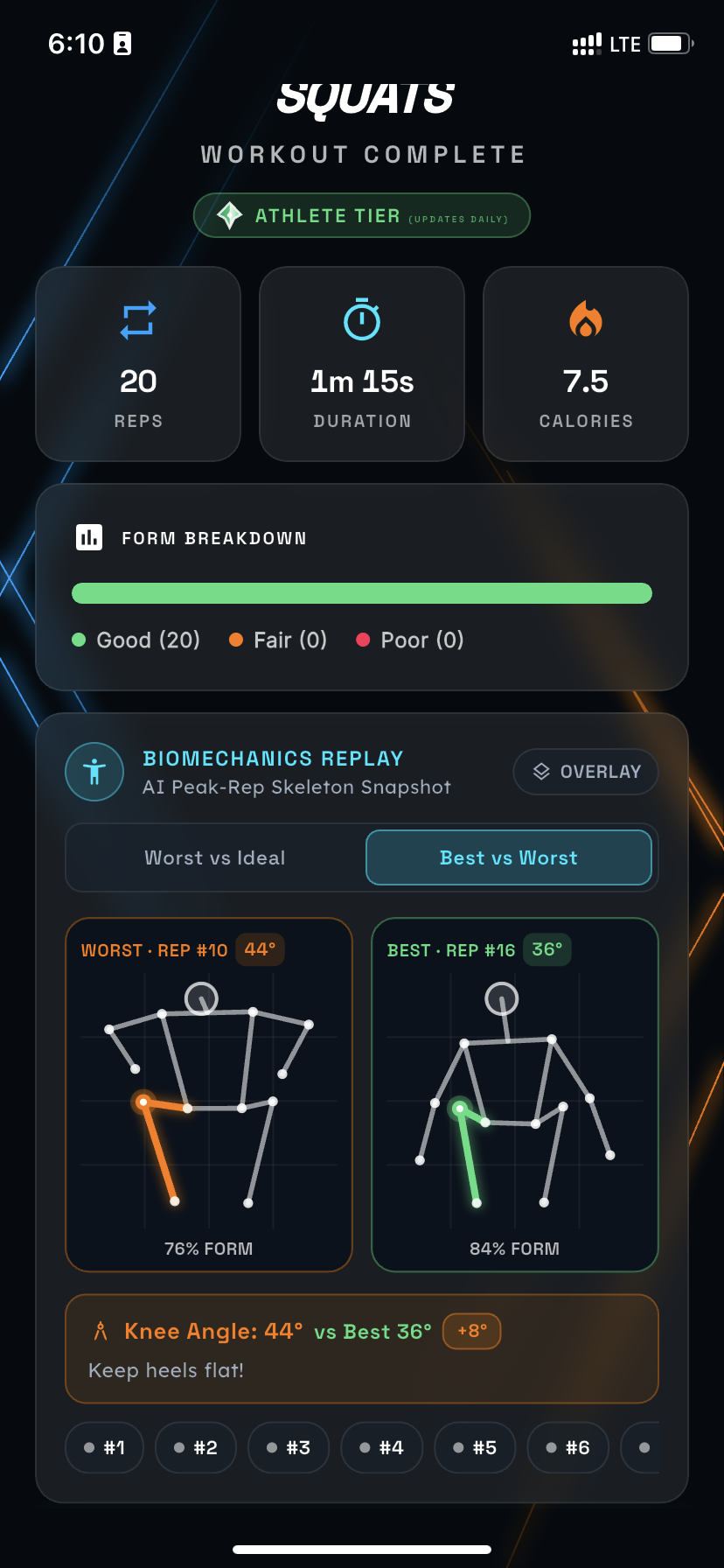
Why You Never "Feel" Your Form Slipping
During a 20-rep set, every repetition may feel identical from the inside due to proprioceptive attenuation—even when your heels begin to lift or your knee angle shifts between reps. Without an inflection snapshot, a "20 Good Reps" summary hides those subtle deviations.
- Worst · Rep #10 (76% Form, 44°): Triggered the live "Keep heels flat!" coaching cue, showing an +8° knee-angle shift relative to the lifter's cleanest rep.
- Best · Rep #16 (84% Form, 36°): Corrected stance and weight distribution mid-set after hearing the cue, recovering cleaner alignment on subsequent reps.
By reviewing both your worst and best inflection frames after every set—and tapping any rep chip (#1, #2, #3…) in the strip—you can verify whether real-time audio cues actually fixed your mechanics.
How Does the Kinematic Ghost Overlay Superimpose Joint Angles?
Direct Answer: The Kinematic Ghost Overlay superimposes two high-contrast joint skeletons directly over one another—such as your worst rep’s 44° knee angle highlighted in amber overlaid onto the 90° parallel Ideal Target in dashed cyan, or your worst rep overlaid onto your best rep. This eliminates guesswork by displaying the exact angular and postural divergence at peak load.
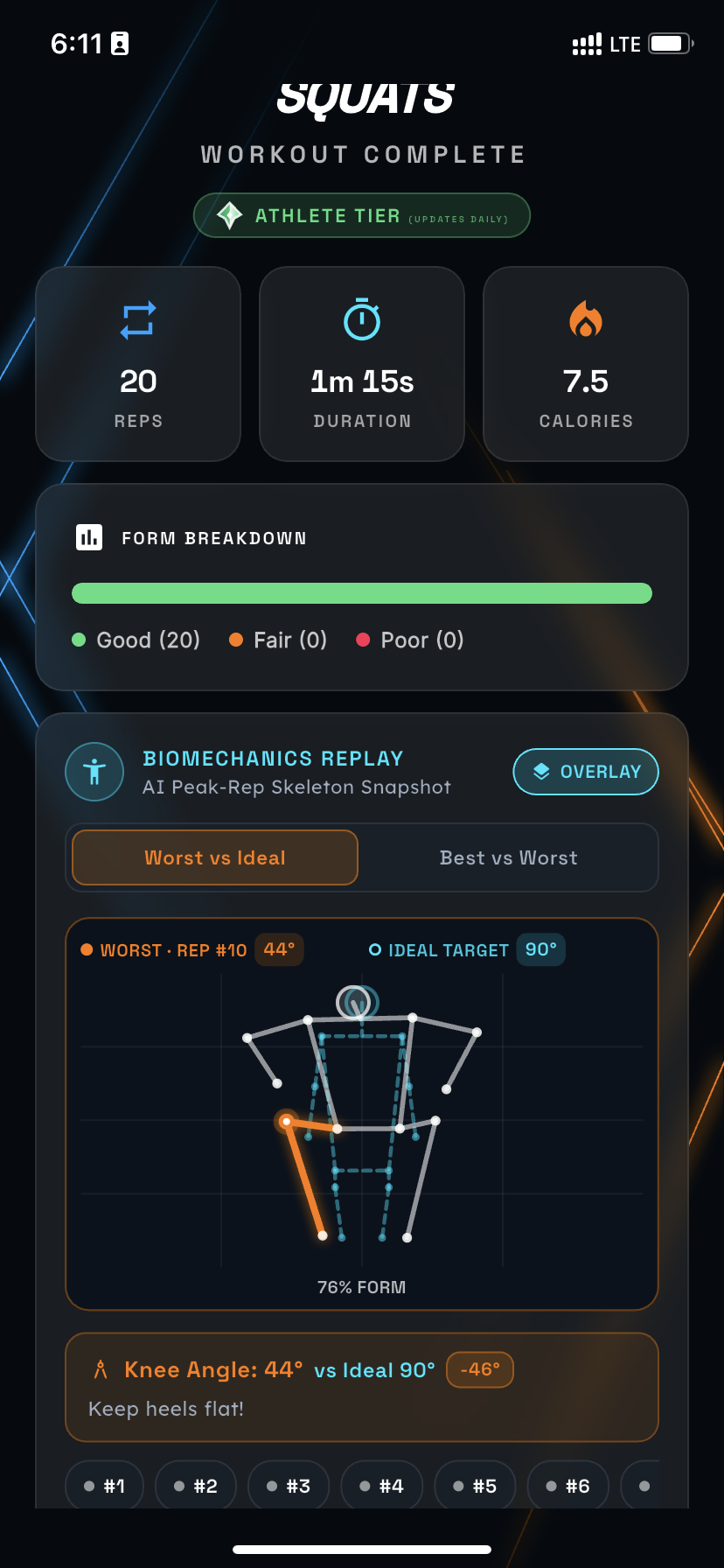
Unmasks Angular Divergence: Rep #10 (44°, 76% form) is superimposed onto the dashed cyan 90° Ideal Target. The -46° knee-angle callout and "Keep heels flat!" cue pinpoint exactly how far the bottom position drifted from controlled parallel.
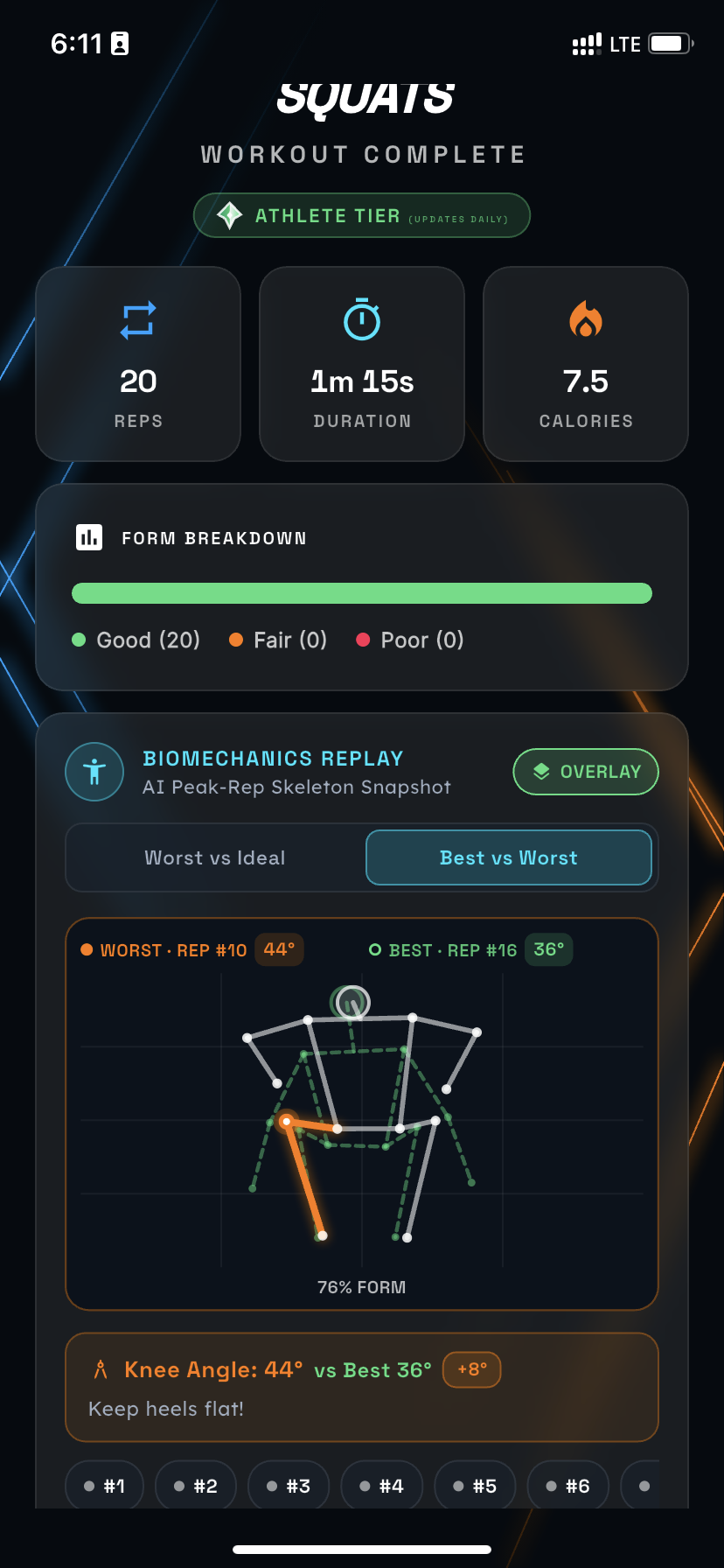
Exposes Inter-Rep Drift: Superimposing Worst Rep #10 (44°, amber) over Best Rep #16 (36°, dashed green) reveals the +8° knee-angle difference and subtle upper-body posture shift between your weakest and strongest repetitions.
Comparison Matrix: How Biomechanics Replay Compares to Traditional Tracking
Direct Answer: Traditional workout tools either count reps blindly without checking form (smartwatches), rely on subjective honor systems (manual logging apps), or produce hours of unindexed video that you never rewatch. Posiqo’s AI Biomechanics Replay combines real-time form gating with instant, privacy-first kinematic inflection snapshots.
| Feature / Capability | ⌚ Smartwatches (Apple/Garmin) | 📱 Manual Logging Apps (Strong/Hevy) | 🎥 Video Self-Recording | 🔬 Posiqo AI Biomechanics Replay |
|---|---|---|---|---|
| Form Checking Method | Wrist accelerometer (Blind to posture) | None (User manual input) | Manual user video review | 33 3D Joint Landmarks (Computer Vision) |
| Peak Depth Measurement | ❌ Cannot measure | ❌ Cannot measure | ⚠️ Subjective visual estimate | ✅ Automated interior angle & delta (e.g. 44° vs 90°) |
| Fatigue Autopsy (Best vs Worst) | ❌ No comparison | ❌ No comparison | ⚠️ Requires manual video editing | ✅ Instant automated side-by-side snapshot |
| Kinematic Ghost Overlay | ❌ Not available | ❌ Not available | ❌ Requires VFX post-production | ✅ 1-Tap superimposed vector overlay |
| Real-Time Voice Coaching | ❌ No form cues | ❌ No form cues | ❌ Silent during set | ✅ Spoken corrections in <100ms |
| Phone Storage Impact | ~50 KB per workout | ~20 KB per workout | 500 MB – 2 GB per workout session | ~30 KB (Pure vector coordinates) |
| User Privacy | Heart rate logged to cloud | Data stored in cloud DB | Personal camera video saved | 🔒 100% On-Device (Zero video uploaded) |
| Price | $250 – $800 hardware | $5 – $12/month subscription | Phone camera storage cost | 100% Free Forever ($0) |
The Privacy Advantage: Pure On-Device Kinematic Vectors (Zero Cloud Video)
Direct Answer: Posiqo performs all computer vision pose estimation directly on your phone’s local neural processor at 30 FPS. Optical frames are analyzed in temporary memory and immediately discarded; only lightweight mathematical joint coordinates are stored. No video of your living room, home gym, or physique ever touches the cloud or an external server.
Privacy by Biomechanical Design
Many fitness enthusiasts avoid video-based training apps because they feel uncomfortable having recordings of their home environment or workouts transmitted over the internet.
Video streams never leave your device. The camera feed is processed in-memory by Google ML Kit and cleared frame by frame.
The Replay snapshot is stored strictly as a compact mathematical wireframe (13 core joint coordinates, < 1 KB per rep). No pixel video exists on your phone storage.
Local neural execution eliminates high-latency cellular network round trips, enabling sub-100ms real-time audio corrections.
How to Access Your AI Biomechanics Replay in Posiqo
- Launch Your Workout: Open Posiqo (free on Google Play or App Store) and choose Squats, Push-Ups, Lunges, or any of our 30+ tracked movements.
- Position Your Phone: Prop your phone against a water bottle or wall 6–8 feet away so your full body is visible in the frame.
- Perform Your Set: Rely on real-time voice cues (“Deeper”, “Knees out”) to maintain strict form throughout your repetitions.
- Inspect the Replay Card: Immediately on your Workout Complete screen, tap into the Biomechanics Replay section.
- Toggle Split & Ghost Modes: Switch between Worst vs. Ideal and Best vs. Worst, or toggle the Overlay button to inspect your superimposed joint lines.
For deeper insights into proper exercise mechanics, explore our comprehensive form breakdowns:
- How to Do Squats Correctly: Form Guide & Common Mistakes
- Why Bad Reps Don’t Count: The Science of Effective Reps
- Workout Form Checker App: Real-Time AI Form Correction
- How to Fix Knee Pain from Squats: Biomechanical Solutions
Clinical Biomechanics & Sports Science References
- Ota, M., et al. (2021). Real-time human movement analysis using mobile computer vision. Sensors, 21(7), 2411. PubMed PMID: 33802341
- Cust, E. E., et al. (2019). Machine and deep learning for sport-specific movement recognition: a systematic review. Journal of Sports Sciences, 37(5), 568-580. PubMed PMID: 30522197
- Schoenfeld, B. J. (2010). Squatting kinematics and kinetics and their application to exercise performance. Journal of Strength and Conditioning Research, 24(12), 3497-3506. PubMed PMID: 20182386
- Hartmann, H., et al. (2013). Analysis of the load on the knee joint and vertebral column with changes in squatting depth and weight load. Sports Medicine, 43(10), 993-1008. PubMed PMID: 23821469
Download Posiqo Free on Google Play to inspect your own peak-rep biomechanics today!
Frequently Asked Questions
What is an AI Biomechanics Replay in workout tracking?
An AI Biomechanics Replay is an on-device computer vision diagnostic that captures and reconstructs a lifter’s 3D kinematic skeleton at the exact bottom inflection point of every repetition. Unlike passive tally counters or raw video scrubbers, it freezes the instant of peak muscular load to measure joint angles and display side-by-side or ghost overlay comparisons.
How does a peak-rep skeleton snapshot measure squat depth?
The peak-rep skeleton snapshot isolates the single frame where your downward velocity reaches zero and upward acceleration begins. Posiqo evaluates the interior knee angle between the hip, knee, and ankle against the 90° parallel target (where 180° is standing straight and angles below 90° indicate deeper flexion), immediately flagging whether you hit controlled parallel depth, cut the rep short above 90°, or collapsed into an over-compressed angle like 47° under fatigue.
What is a Kinematic Ghost Overlay in fitness coaching?
A Kinematic Ghost Overlay is an advanced visual coaching mode that superimposes two kinematic skeletons on top of one another. Lifters can superimpose their worst-rep peak-load joint position against the 90° ideal benchmark, or overlay their worst repetition on top of their best repetition in the set to visualize joint-angle drift and alignment shifts.
Why does exercise form degrade as muscular fatigue sets in?
As target muscle motor units exhaust their glycogen reserves and experience intracellular acidosis, the central nervous system instinctively triggers compensatory movement pathways. During squats, this causes lifters to unconsciously cut range of motion, lift their heels, collapse at the bottom of the rep, or cave their knees inward (valgus collapse).
Is video footage stored or uploaded during AI Biomechanics Replay?
No. Posiqo processes all camera frames entirely on your smartphone processor using local neural networks. Video frames are discarded immediately after joint coordinates are calculated, and only compact 13-point core wireframe snapshots are retained on-device—ensuring complete personal privacy with zero cloud video uploads.
Ready to Test Your Form in Real Time?
Get real-time spoken audio coaching through your earbuds while you train. 100% free forever — 100% private, zero video ever leaves your phone.
Free to download · Android & iOS · 100% On-Device AI
Bodyweight Calorie & Mechanical Work Estimator
Select any exercise to compute true range-of-motion mechanical work based on physics: Work = Mass × Gravity × Height × Reps.
⚡ Want 100% exact precision? Posiqo uses your phone camera to count reps only when full ROM is achieved.
Track Workouts Live on Posiqo AI ➔Are You Doing Exercises With Dangerous Form?
Answer 3 quick questions to discover your form risk score.
1. When doing bodyweight squats, do your knees shift inward?
2. During planks or push-ups, do your lower back/hips sag down?
3. Do you count reps even if you didn't go all the way down?
Form Risk Identified!
You are likely losing 40%+ of exercise gains due to hidden posture compensations.
Fix Form Live with Posiqo AI Camera ➔
Point Camera ➔ Opens Google Play Store directly